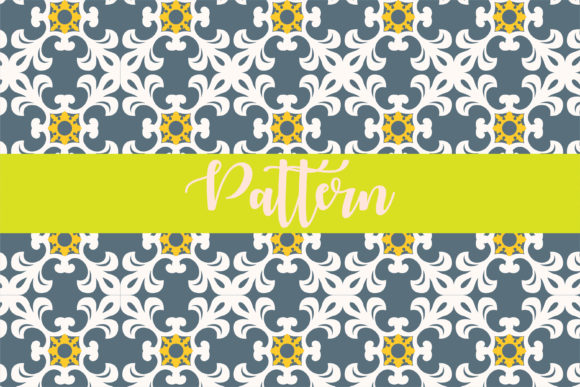
Patterns Design Snowflake: A Practical Look at Pre-Made Vector Patterns for Winter Projects
When you need a seasonal accent for a product, invitation, website, or craft project, a snowflake pattern is a classic choice. But creating one from scratch takes time, and finding a ready-to-use design that fits your technical requirements can be more complex than it seems. Patterns Design Snowflake represents a specific kind of digital resource: a pre-made, fully editable vector pattern designed to be resized, recolored, and applied without starting from zero. Before you download or purchase any pattern pack, it helps to understand what this format offers, how it compares with other approaches, and where it fits best in your workflow.
What Sets Patterns Design Snowflake Apart
At its core, Patterns Design Snowflake is a seamless repeating pattern delivered in a bundle of vector and raster file types. The pattern is sized at 12 x 12 inches, which means it tiles cleanly across a surface without visible seams. The files include native vector formats (Ai, EPS) that allow you to change colors globally, as well as a high‑quality JPEG and a PDF for quick previews or non‑editable uses. The design itself is a snowflake motif, but the real distinction lies in the delivery and flexibility. Unlike a static clip‑art image, this pattern is engineered for modification: you can shift the color palette to match a brand identity, scale it up or down without losing resolution, and export it for print or screen use. For anyone who works with seasonal graphics, retail packaging, or digital backgrounds, having a pattern that can be adapted in minutes rather than hours changes the way you plan a project.
Custom‑Designed Snowflake Patterns
Hiring a designer to create a unique snowflake pattern from scratch gives you complete creative control. You can specify exact spacing, snowflake styles, and color gradients. The tradeoff is cost and time: a custom pattern might take days and cost significantly more than a pre‑made pack. Patterns Design Snowflake occupies a middle ground: it offers a professional, finished look at a fraction of the price and immediate availability. If your project has very specific requirements—like a non‑standard size, a particular snowflake shape that isn’t included, or a need for exclusive rights—custom design remains the better fit. For most seasonal updates, promotional materials, or personal projects, a flexible pre‑made pattern is a practical shortcut.
Free Stock Snowflake Patterns
Free resources can be tempting, but they often come with limitations. Low resolution, missing vector files, watermarked previews, or restrictive licenses can cause problems down the road. Patterns Design Snowflake includes a full set of editable and printable files, which means you can use it for commercial work (depending on the shop’s license) without worrying about pixelation or file incompatibility. Free patterns also rarely offer 100 color changeable options; you usually get one fixed palette. If you need a specific hex code or want to test multiple color ways quickly, the vector‑based approach of this pattern set is much more efficient.
Other Pre‑Made Pattern Packs
The market is full of winter pattern sets, but they vary widely in file quality and editing capability. Some packs provide only JPEGs or low‑resolution PNGs, making resizing difficult. Others include vector files but use complex, unorganized layers that are hard to recolor. Patterns Design Snowflake emphasizes that all colors are changeable, and the files come in a compressed ZIP folder for easy access. When comparing packs, check for the presence of an editable AI or EPS file, the ability to scale without quality loss, and a clear size specification (12 x 12 inches is a standard tile size for many print applications). These details matter more than the number of patterns because they determine whether you can actually adapt the design to your medium.
Strengths
- Time savings: Instant download and immediate editing.
- Color flexibility: 100% changeable colors via vector layers.
- Scalability: Vector format means you can enlarge the pattern for banners or shrink it for business cards without artifacts.
- Multi‑format support: Ai, EPS, PDF, and JPEG cover most design software and quick‑print needs.
- Seamless tile: The pattern repeats cleanly, which is essential for fabric, wallpaper, or digital backgrounds.
Tradeoffs
- Design limitation: You are working with one snowflake motif, not an entire library. If variety across multiple projects is required, you may need several pattern sets.
- Software requirement: Full editing of colors and scaling typically requires Adobe Illustrator or a compatible vector program. (The PDF and JPEG are accessible without it.)
- Unzipping step: Files are compressed in a ZIP archive; you need extraction software (like WinRAR) and basic familiarity with managing archived files.
- No exclusive rights: The same pattern may be purchased by other users, so it is not ideal for a one‑of‑a‑kind brand identity.
When to Choose Patterns Design Snowflake
This type of pattern works particularly well in situations where speed and adaptability take priority over uniqueness. For example, a small business preparing holiday gift wrap might need a quick, repeatable snowflake design that can be color‑matched to their brand. With Patterns Design Snowflake, you open the AI file, select the elements, and assign your brand’s blue or red in a few clicks. Similarly, a party planner creating custom snowflake backdrops for a winter event could resize the pattern to any dimension without losing sharpness. The 12 x 12 inch tile size is also convenient for standard printing layouts, reducing wasted space and alignment guesswork.
On the other hand, if you are designing a premium product line that requires a completely original snowflake motif—say, for a high‑end ski resort menu—the pre‑made nature of this pattern might feel too generic. In that case, combining a base pattern with custom snowflake elements or using the pattern as a starting point for further illustration could bridge the gap. The key is to evaluate your project’s need for exclusivity versus efficiency.
File Format Compatibility
Ensure your design software can open AI or EPS files. If you work primarily in Canva or Procreate, the PDF and JPEG versions still give you a usable pattern, but you lose the ability to change colors freely. For users who want maximum flexibility, vector editing tools are essential. Patterns Design Snowflake includes the most common professional formats, but it is worth confirming that at least one of them matches your typical workflow.
Color Changeability
Not all “color changeable” patterns are created equal. Some are delivered with embedded textures or clipping masks that make recoloring tedious. A clean vector file with well‑named layers lets you swap hues in seconds. The description mentions 100 color changeable, which suggests the pattern is built for straightforward palette adjustments. When comparing with other packs, look for this level of editability rather than just the claim of being vector.
Resizing Without Quality Loss
Vector patterns scale infinitely, but the integrity of the seamless repeat can break if the tile size is not proportionally respected. The 12 x 12 inch tile is a fixed repeat size, meaning that if you enlarge the pattern dramatically, you might see the repeating edge if the background is not extended. For most applications (stationery, fabric, wrapping paper, digital backgrounds), the tile size is ample. For wall‑to‑wall murals, you may need to duplicate the tile manually. Understanding the tile dimensions helps avoid surprises during production.
Realistic Example: Using Patterns Design Snowflake for Holiday Cards
Imagine you are creating a set of holiday cards for a local florist. You want a subtle snowflake background that can be printed in the florist’s signature teal. Instead of commissioning an illustrator (budget: $300 and a week turnaround), you purchase a Patterns Design Snowflake set. After downloading the ZIP file and extracting it, you open the EPS in Illustrator, select the snowflake group, and replace the white and blue colors with teal and off‑white. You scale the pattern to fit a 5×7 inch card front, export as a high‑resolution PDF, and send to print. The entire adaptation takes under 20 minutes. The result is a professional, cohesive design that aligns with the brand without requiring advanced illustration skills.
Making an Informed Choice
The value of Patterns Design Snowflake depends largely on your project’s tolerance for time, cost, and specificity. For designers who frequently need seasonal elements, having a library of editable vector patterns can speed up production considerably. For someone who only needs one snowflake background for a personal project, the price and effort are minimal compared to learning to draw snowflakes from scratch. The most common mistake is assuming that all pattern packs offer the same level of editing—checking the file list and format details before purchasing saves frustration.
If your work often involves modifying colors, scaling, or repeating a motif across different mediums, a well‑structured pattern like this one is a practical resource. If you require total ownership of a design or need a very specific snowflake style not covered by the pack, then a custom approach or a different pattern set with a broader range of motifs might serve you better. Evaluating your software skills, the importance of color flexibility, and the intended use of the pattern will guide you to the right decision.
Ultimately, Patterns Design Snowflake is a tool that sits at the intersection of convenience and capability. It does not promise to be the only pattern you ever need, but it delivers on the essentials: a clean, editable, seamless snowflake design that can be adapted to many contexts. By weighing its strengths against your own requirements, you can decide whether it complements your project or whether you need something else entirely. Either way, knowing what to look for in a digital pattern—file variety, color control, tile size, and editing ease—helps you make smarter picks for future projects as well.